Social Media Automation Using n8n: A Smarter Way to Manage Your Time
Learn how to automate social media posting using n8n, Google Sheets, and APIs for Instagram, LinkedIn, and Twitter. No-code workflow walkthrough included!

I Automated My Social Media Posting — So I Can Actually Enjoy My Evening
Or: how I taught n8n to handle my content hustle like a virtual assistant on steroids.
Why I Did This
If you're anything like me, managing social media feels like a full-time job you didn’t apply for.
I found myself copying captions from Google Docs, downloading images, opening apps, pasting everything, uploading, re-uploading, clicking around — for each platform. Every. Single. Time.
That’s when I thought: “Can I automate this mess and just control everything from a Google Sheet?”
Spoiler: Yes. You totally can.
If you're new to automation, n8n's getting started docs are a great place to begin.
What I Built
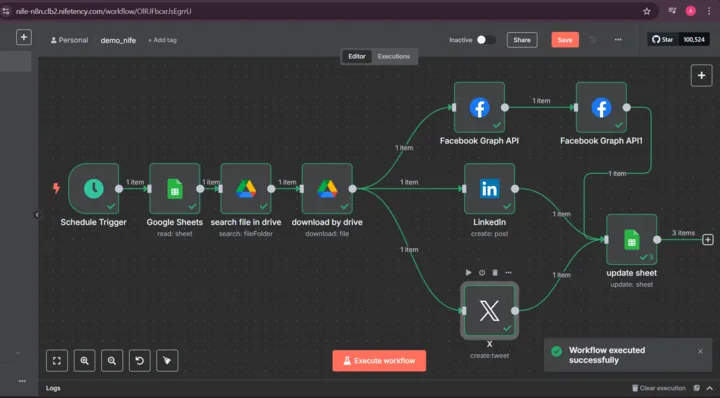
Using n8n, I created a workflow that does the following — all by itself:
- Looks at a Google Sheet for scheduled posts
- Finds the image in Google Drive
- Posts the content to Instagram, LinkedIn, and X (formerly Twitter)
- Updates the Sheet so I know what’s been posted
And the best part? I don’t even have to be awake for it to run.
The Stack
This is a no-code/low-code build. Here’s what I used:
- n8n for automation
- Google Sheets as my content planner
- Google Drive to store my media
- Facebook Graph API to post on Instagram
- Twitter API
- LinkedIn API
Looking to integrate more platforms? Check out n8n’s list of integrations — it supports hundreds of apps.
How It Works
1. The Schedule Trigger
It all starts at 7 PM. n8n checks if there’s any post with Status = Scheduled.
2. Pull from Google Sheets
If there's something to post, it grabs:
- The filename of the image
- The caption (called “Links” in my sheet)
- The row number (to update later)
3. Search & Download the Image
Using the filename, it finds the matching image in a shared Google Drive folder and downloads it.
4. Post It Everywhere
Then, using different APIs:
- It tweets the caption on X
- Posts the image + caption to LinkedIn
- Uploads the image and publishes it on Instagram via the Facebook Graph API (yep, it’s a 2-step process)
5. Update the Sheet
Once done, it changes the Status to Uploaded — so nothing gets posted twice.
My Sheet Looks Like This
| Topics | File name | Links (caption) | Status |
|---|---|---|---|
| Weekend | beach.png | “Weekend vibes” | Scheduled |
| Code Life | code.jpeg | “New dev blog out now” | Uploaded |
Things I Learned
- Instagram’s API is wild. You’ll need a Facebook Business Page, a connected IG account, and a developer app. But once it's set up, it’s smooth.
- OAuth tokens will test your patience. Save them in n8n credentials and be kind to your future self.
- Debugging in n8n is a joy. You can click on any node, see the exact data flowing through, and fix stuff on the fly.
What’s Next
- Add OpenAI to auto-generate captions (maybe even suggest hashtags)
- Log post metrics in Notion
- Make it support image carousels and videos
How to Get Started
- Sign up for n8n: It’s free to start, and you can self-host or use their cloud version.
- Create a Google Sheet: Set up your content planner with columns for topics, file names, captions, and status.
- Connect Google Drive: Store your images in a shared folder.
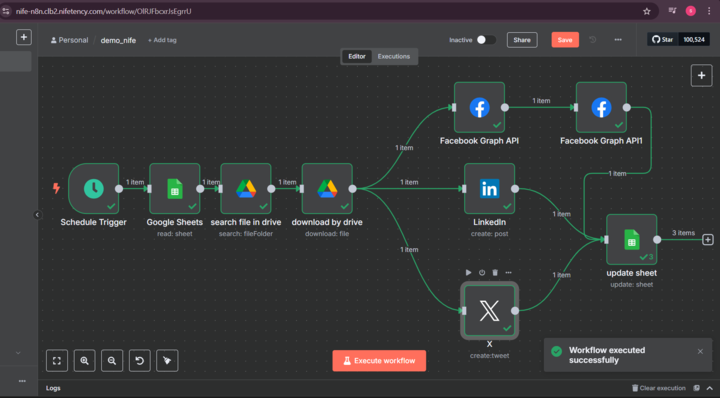
- Set Up n8n Workflow: Use the Google Sheets, Google Drive, and social media nodes to build your automation.
- Test It: Run the workflow manually first to make sure everything works as expected.
- Schedule It: Set the trigger to run at your preferred time (like 7 PM) so it posts automatically.
- Sit Back and Relax: Enjoy your evenings while n8n does the heavy lifting.
- Iterate: Keep improving your workflow as you learn more about n8n and your social media needs.
Final Thoughts
This isn’t just a time-saver — it’s a mindset shift. Automate the repetitive stuff, so you can focus on the fun, creative, human things.
Hope this inspires you to give your own daily hustle a virtual assistant. If you try it — let me know. I’d love to see what you build!
You can also explore tools like n8n on the Nife.io Marketplace to easily automate your cloud storage and workflow operations
For better team collaboration and project visibility, try Teamboard from Nife.io—a unified space to manage tasks, track progress, and work more efficiently.
Deploy on Nife
Ready to deploy? Check out the Nife documentation:
From the team at Nife
Deploy your next app in minutes, not days.
Nife is a multi-cloud edge platform that lets you deploy, scale, and manage applications globally without the infrastructure headache.